WhatsApp Business for small business

WhatsApp Business Features Every Business Should Use in 2026

Many small businesses find it easier to convince clients to send a message rather than fill out a lengthy contact form or call. This is one of the reasons WhatsApp has grown in popularity among enterprises, freelancers, creators, retailers, service providers, and local shops.

However, simply having a WhatsApp Business account isn’t enough.
The platform contains a number of features that can help businesses respond to clients faster, display items, organize conversations, promote specials, and strengthen customer relationships.
In this post, we’ll look at the most helpful WhatsApp Business features for businesses and explain how to utilize them effectively.

Do not turn every message into a sales pitch.

One of the most common mistakes businesses make on WhatsApp is to send promotional messages all the time.

If every message reads:
“BUY NOW!”

Customers may cease paying attention.
Balance promotional and useful information.

For example:

Monday: Product Update
Tuesday: helpful tip.
Wednesday: Customer Review
Thursday: Educational content.
Friday: Special Offer.
Saturday: Behind the scenes.
Sunday: Weekly Update

1. Create a complete WhatsApp business profile.

When a customer contacts you, one of the first things they’ll notice is your business profile.
Do not leave it incomplete.
Include crucial information such as:
 –>Business name
 –>Business category
 –>Description
 –>Address or Service Area
 –>Business Hours
 –>Website
–>Email Address

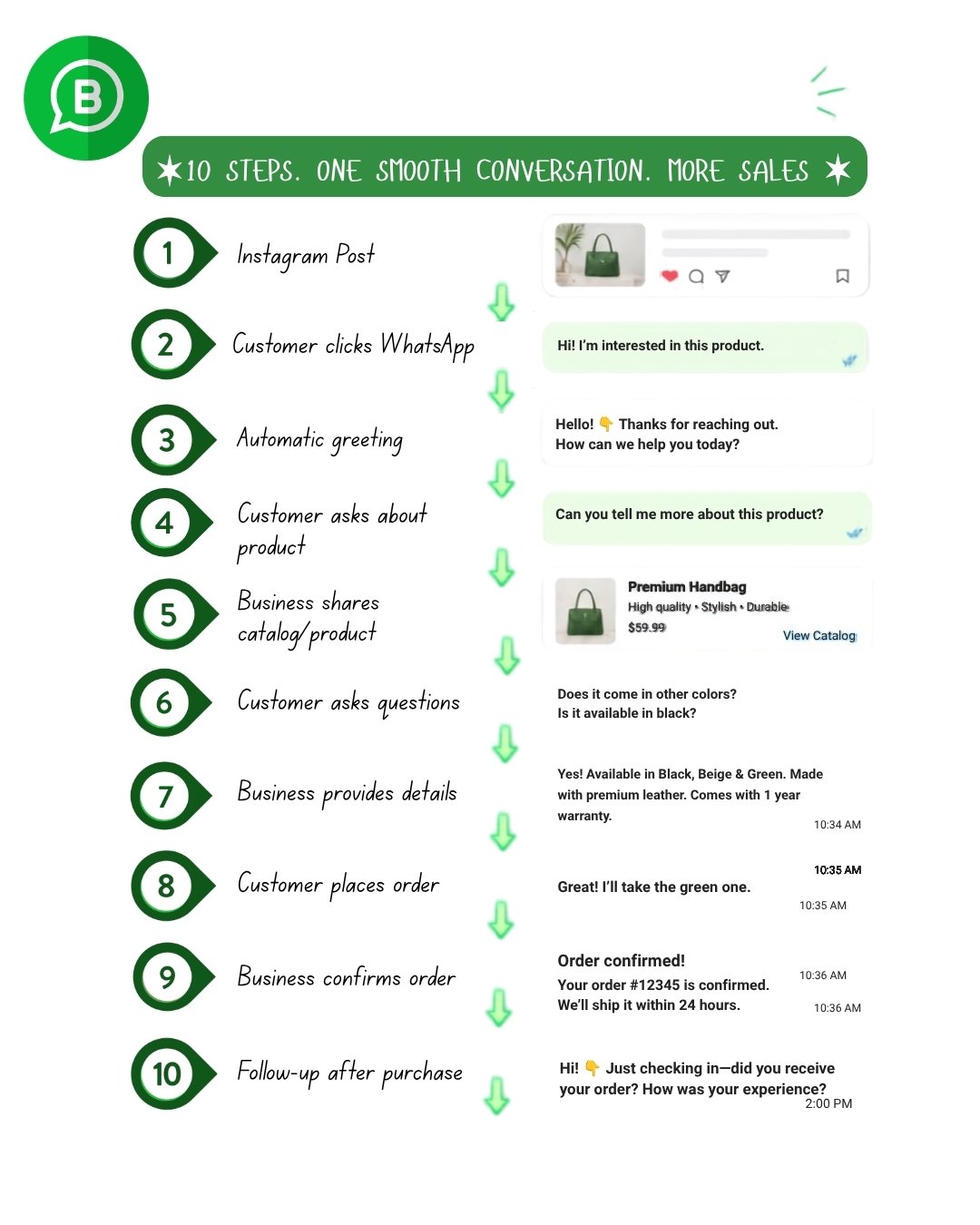
2. Use the Business Catalog.

If you sell things or services, the Catalog can serve as a tiny digital storefront within WhatsApp.
You can include information like this:
 –>Product name.
 –>Price
 –>Description
 –>Product pictures.
 –>Product or service details

3.Set up a greeting message.

Customers should not feel as if they are messaging an abandoned number.
WhatsApp Business enables enterprises to send automated greeting messages in supported configurations.
For example:
Hi! 👋 Welcome to ABC Fashion. Thank you for contacting us. How may we help you today?

4. Use Away messages.

You cannot respond to every communication quickly.
You might be:
 –>Sleeping
 –>Driving
 –>In a meeting.
 –>Outside of business hours
–> On holiday
An away message might inform clients about when they can expect a response.

5. Use WhatsApp Status for marketing.

Many firms consider WhatsApp Status an afterthought.
That is a squandered chance.
Status can be used for sharing:

 –>New items.
 –>Discounts
 –>Offers
 –>Behind the scenes content
 –>Customer Reviews
 –>Product demos.
 –>Business updates.
 –>Educational tips
 –>New arrivals.
 –>Limited-time promotions.

6. Share Products Directly from Your Catalog.

When a customer asks:
“Do you carry black handbags?”
You don’t have to provide multiple random images.
If the product is listed in your catalog, you can share it immediately.
This gives the customer structured information and makes the conversation easy to follow.

7. Use WhatsApp Status to Build Trust.

People do not merely purchase products.
They purchase from companies they trust.
Status allows you to reveal the actual aspect of your business.

You can make a post:
–>Customer testimonials.
–>New stock arrives.
–>Team activities.
–>Product Packaging
–>Completed projects
–>Behind the scenes videos
–>Before and after outcomes.
–>Business Milestones
WhatsApp Business for small business

WhatsApp Business is meant for businesses who wish to communicate with their consumers via WhatsApp.
Unlike a standard WhatsApp account, the Business app has tools specifically built for customer communication and business marketing.
Depending on your account, area, and WhatsApp’s current feature availability, you can have access to tools like:

Business Profile:

–> Catalog
–> Quick responses.
–> Greeting messages.
–> Away messages
–> Labels Status
–> Product sharing
–> Click-to-WhatsApp Communication
–> Messaging and customer management tools

Larger enterprises can also use the WhatsApp Business Platform to streamline customer care and messaging procedures.

When opening a business account, follow this checklist:


* Complete your business profile.
*  Add your business description.
*  Add business hours.
*  Review your plan on a frequent basis.
* Add your website.
*  Create a catalog of your products or services.
* Set a greeting message.
*  Make a “away message.”
*  Prepare typical Quick Replies.
*  Create customer labels.
*  Start utilizing WhatsApp status.
*  Add a WhatsApp button on your website.
*  Add WhatsApp to your Instagram profile.
*  Create a straightforward lead follow-up process.
*  Gather customer feedback.
*  Track inquiries and conversions.

WhatsApp Business is meant for businesses who wish to communicate with their consumers via WhatsApp.
Unlike a standard WhatsApp account, the Business app has tools specifically built for customer communication and business marketing.
Depending on your account, area, and WhatsApp’s current feature availability, you can have access to tools like:

Business Profile:

–> Catalog
–> Quick responses.
–> Greeting messages.
–> Away messages
–> Labels Status
–> Product sharing
–> Click-to-WhatsApp Communication
–> Messaging and customer management tools

Larger enterprises can also use the WhatsApp Business Platform to streamline customer care and messaging procedures.

WhatsApp Business versus WhatsApp Business Platform.

It’s critical to recognize that these are not the same thing.

WhatsApp Business App

Generally suited for:
Small businesses.
Local shops
Freelancers
Individual Service Providers
Small teams.

It offers practical strategies for managing client conversations.


WhatsApp Business Platform

Generally meant for enterprises that require advanced communication capabilities and integrations.

It can be used for the following:
Automated customer journeys.
CRM Integrations
Larger-scale messaging
Notifications
Customer Support Workflows
Business Automation
The exact features, pricing, and eligibility may vary.

Common WhatsApp Business Mistakes to Avoid:

Sending too many promotional messages.
Customers do not want to receive adverts all day

Ignore customer messages.
Slow replies can result in wasted chances.

Using an incomplete profile.
Customers may be hesitant to trust a firm with limited information.

Not organizing leads.
Without labels or a system, potential clients are easily overlooked.

Sending unclear information.
When applicable, always provide explicit pricing, product specifications, availability, and next steps.

Using spamming methods
Do not send unsolicited bulk communications or contact people who do not wish to hear from you.

Share important information.
Never seek passwords, OTPs, PINs, or other sensitive authentication information from customers.

Pro Tip – 

WhatsApp Business may be much more than just a chat platform.
When implemented appropriately, it can serve as a simple customer communication, sales, support, and marketing channel for your company.

Begin with the basics:
Create a professional profile, build your catalog, set greeting and away messages, respond quickly, organize clients with labels, use Status for content, and follow up properly.

Once those systems are operational, you may look into more complex possibilities like WhatsApp advertising, integrations, and the WhatsApp Business Platform.

The most significant advantage is not simply having more features.
It employs the appropriate features to make it easier for clients to discover your company, ask questions, trust you, and finally purchase from you.

Most Asked Common Questions  ?

Is WhatsApp Business free?
The WhatsApp Business app is intended for businesses and includes business-specific features. Some advanced WhatsApp Business Platform functionalities may incur charges, based on the service, messaging category, area, and current Meta pricing.

Is WhatsApp Business suitable for small businesses?
Yes. Small businesses can improve their client interactions by utilizing tools such as business profiles, catalogs, rapid replies, labels, and Status.

Can I sell things with WhatsApp Business?
Businesses can use supported catalog features to exhibit their items or services and communicate with customers about purchases. The specific purchasing and payment options available vary depending on the market and account configuration.

How can WhatsApp Business help with marketing?
Businesses can leverage Status, product catalogs, customer chats, and Meta advertising options to direct consumers to WhatsApp conversations.

What is the best WhatsApp Business feature for a beginner?
For most small businesses, begin with the Business Profile, Catalog, Quick Replies, Greeting Message, Labels, and Status. These give a solid basis without requiring complex automation.

Leave a Comment

Your email address will not be published. Required fields are marked *